Tuesday, July 31, 2007

IFoo or just Foo? Please stop naming interfaces IFoo.

I am not sure where the idea came from to name intefaces IFoo, but I think the practice is counter-intuitive and generally ugly. Java is not C++, nor C, and it most definitely is not Windows, so why do we have a good section of the Java community dead set on writing pre-historic looking code?

Aside from the aesthetic issues, which is important if you ask me -- code that looks funny most definitely smells funny, I believe naming an interface IFoo instead of Foo really misinterprets the fundamental idea of what an interface is.

An interface is an object - at least from the standpoint of the code that calls it. When you deal with it in code, there is no distinction between an interface and a full blown class. That, in my opinion is the beauty of Java. We can argue all day long about whether or not Java should have multiple-inheritance, the fact is that it does not. And in its place is a rather elegant solution - multiple interfaces.

My point is, when I instantiate FooImpl that implements Foo, for all intents and purposes, FooImpl is not a FooImpl, it is a Foo. If FooImpl happens to implement Bar, then it is also a Bar, but it most definitely is not an IFoo or an IBar.

To further belabor the point, calling your interface IFoo or IBar demotes the status of the interface, and the resulting "object" that is used by clients of the implementation of IFoo or IBar, thus subtly changing the way a programmer understands your code. It is as if the interface IFoo is second in nature to the implementation. But nothing could be further from the truth. Design by Contract means that you are coding to interfaces as first class citizens, not backwater denizens of the design. The implementation is what does NOT matter, and that's why you call it FooImpl, because you could have SuperDuperFooImpl and ReallyLameFooImpl too. The point is that any one of these is a Foo, and that's all your program should care about.

If you disagree with my opinion, look no further than Java Collections, do you implement an IMap or a Map? Josh Bloch had it right, so stop using IFoo already.

I am sure you'll still disagree with me, so flame on in the comments...

p.s. In the "nobody's perfect department", we even have examples in our own Terracotta code base.

Saturday, July 21, 2007

Email This (Link) for iPhone

Problem:


Send a link to a friend via iPhone

Solution:


Add an email bookmarklet to your links. I found this one at macosxhints.com:


javascript:location.href='mailto:?SUBJECT='+document.title+'&BODY='+escape(location.href)


Add this bookmark to your bookmarks bar in Safari, synchronize with iPhone, and you can send links to friends on your iPhone. I wonder if there is a way to access the SMS application?

Monday, July 16, 2007

Distributed Groovy in 5 minutes

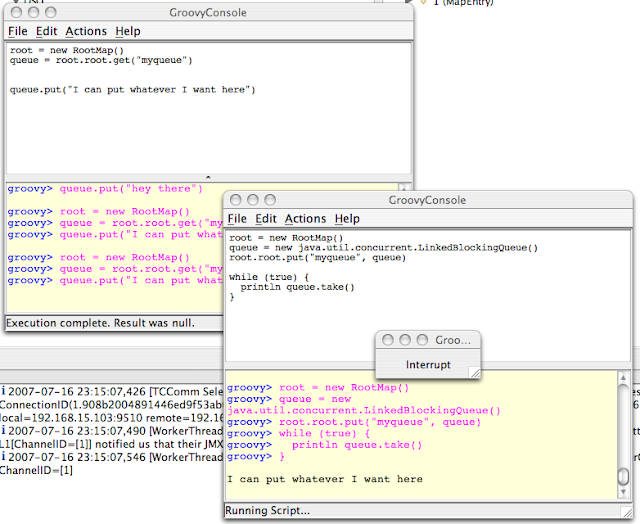
Ok Groovy is cool, but can your Groovy do this?


This took me about 20 minutes to do with Terracotta.  If you're not new to Terracotta, this is pretty old hat.  Distributing a LinkedBlockingQueue is really easy (as seen above).  But then again, being able to use Groovy to distribute anything in Java is ... well pretty powerful.

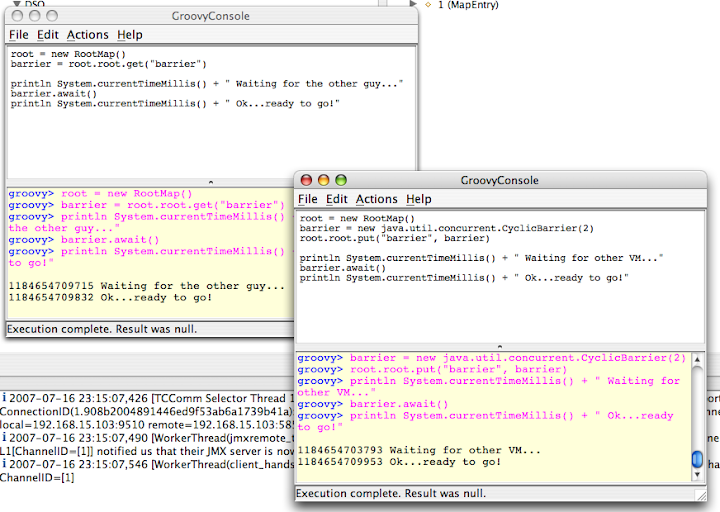
What if you wanted to synchronize two scripts?  Just use a java.util.concurrent.CyclicBarrier:


I could build a distributed test harness in ... oh I don't know another 10 minutes.  But I'll leave that up to you :).

Here's how to get going with Clustered Groovy:

1) Download and unpack Groovy.
2) Set GROOVY_HOME (per their instructions)
3) Download and unpack Terracotta. (Hint: get Version 2.4.  If it's not already final, it will be soon)
4) set TC_HOME (this makes your life easier)
5) You need my Groovy Startup Script - I saved it as groovyConsoleTC.  Sorry, I use a Mac so it is not Windows friendly, but at 5 lines, hopefully you can figure it out:

DIRNAME=`dirname "$0"`

TC_INSTALL_DIR=${TC_HOME}
. "${TC_INSTALL_DIR}/bin/dso-env.sh" -q $DIRNAME/groovy-tc.xml
JAVA_OPTS=$TC_JAVA_OPTS
echo $JAVA_OPTS

. "${GROOVY_HOME}/bin/startGroovy"

startGroovy groovy.ui.Console "$@"


6) You need my RootMap class.  It's not that pretty, it could be improved, but it works:


import java.util.*;
import java.util.concurrent.*;

public class RootMap
{
public final Map root = new ConcurrentHashMap();
}


7) You need my Terracotta config (save it to a file called groovy-tc.xml)


<?xml version="1.0" encoding="UTF-8"?>
<!--

All content copyright (c) 2003-2007 Terracotta, Inc.,
except as may otherwise be noted in a separate copyright notice.
All rights reserved.

-->
<tc:tc-config xmlns:tc="http://www.terracotta.org/config"
xmlns:xsi="http://www.w3.org/2001/XMLSchema-instance"
xsi:schemaLocation="http://www.terracotta.org/schema/terracotta-4.xsd">
<servers>
<server host="%i" name="sample"/>
</servers>
<system>
<configuration-model>development</configuration-model>
</system>

<application>
<dso>
<instrumented-classes>
<include>
<class-expression>Root*</class-expression>
<honor-transient>true</honor-transient>
</include>
</instrumented-classes>
<locks>
<autolock>
<method-expression>* *..*.*(..)</method-expression>
</autolock>
</locks>
<roots>
<root>
<field-name>RootMap.root</field-name>
</root>
</roots>
</dso>
</application>
</tc:tc-config>


If you saved all that to some directory, now:

8) Compile RootMap.java : > javac RootMap.java
9) Make sure your classpath has . in it: > export CLASSPATH=.
10) start up the TC Server in $TC_HOME/bin/start-tc-server.sh
11) start one ore more Groovy Consoles using groovyConsoleTC

Validate you can see a root by executing a Groovy script:


root = new RootMap()
root.root.put("message", "Hello World")


If you run the admin console, you can see your root:

> $TC_HOME/bin/admin.sh

Now try out more advanced stuff like LinkedBlockingQueue!

Update: I've added a tar.gz file with the relevant code: distributedGroovy.tgz

Thursday, June 21, 2007

So you want buzz, eh? Do it in style with del.icio.us, pipes, and widgets

It seems buzz is all the buzz these days.

If you don't want to be left behind in this day and age of blogs, mashups, rss, widgets, ajax and yes, even comets, you've come to the right place to generate some buzz, and you won't even need a full-time intern to do it!

Today I am going to show you how to put together a complete buzz generating engine, in just three simple steps, that is fully distributed and collaborative, but more importantly is completely web 2.0 and buzzword compliant. Sound good? Good. :)

So here we go. Before we start, let's ground this exercise in something concrete. Imagine a marketing droid has come to you with the preceding two paragraphs, and you need to understand what in the heck he actually means.

If you page on over to www.terracotta.org, scroll on down past all the stuff about Terracotta, and have a look at the section marked "Terracotta Buzz". Ok, I understand you're a bit lazy with the ol' mouse click, so I've included a screenshot to the right for your convenience. It says "Terracotta Buzz" and then a list of links. What the marketing droid wants is:

  • A dynamic list of links, kept up to date
  • Relevant content, not just random links (try searching for Terracotta, you'll see the term is a bit generic so it can be difficult to discern real buzz from somebody's trip to China)


What you want, because you don't have any spare time in your day, is a process that:
  • Is easy to maintain, requiring no intervention on your part
  • Is up-to-date (what good is buzz if it's not up to date?)
  • Is distributed and collaborative (you won't be the only person contributing, that way you can get on with your life)


Got it?  Ok here we go.   Three easy steps.  I wouldn't lie to you, now would I?

Step 1 - Add the Widget to your page


On your buzz page, setup an RSS widget that reads an RSS feed. When users browse your site, the RSS widget reads the RSS feed and gives them the most up to date info.  Did you notice the Terracotta Buzz on the right of my blog?  That's an RSS widget BlogSpot gives you, putting it on your blog page is trivial.  

Step 2 - create a Yahoo pipe


Set up a Yahoo account and create a Yahoo pipe that aggregates RSS feeds from delicious users that are going to generate the buzz for you. Here's the Terracotta Buzz Pipe.

It's the heart of this process, so I'll explain what it does:
  • Aggregate content from various sources, including delicious accounts of contributors to Terracotta, RSS feeds from people that blog about Terracotta (like myself)
  • Remove duplicate entries
  • Publish one aggregate feed as the result


Step 3 - Tag links using del.icio.us


After creating the Yahoo Pipe to aggregate del.icio.us links, now all you have to do is populate those links.  As the tagger, you want to create a unique set of tags that can be used in the Yahoo!  Pipe feed to pull in just the Buzz links.  I use the special tag "forterracotta", which you can see by browsing my links here:
That is all there is to it.  There's an optional step to burn your feed using Feedburner which adds an extra level of abstraction above the Yahoo! Pipes feed, and gives you the ability to track subsribers.  It's a nice touch, but not strictly necessary.

Summary


Putting it all together, here is the complete diagram of the process:

Thursday, June 07, 2007

Using delicious in ways you haven't thought of before...

While not technically Java related, I thought I would highlight a neat way to use delicious that you may not have thought of before.

The motivation for this came when my boss came to me and said hey look, man, we need to analyze the data on our forum a little better so that we can better understand what our users are looking for, what problems they are running into etc.

So I'll start there. If you haven't figured it out yet already, I work for Terracotta, and our user forums are over here:

http://forums.terracotta.org/forums/forums/list.page

A blog post for another day will be how we do some neat gymnastics with RSS and Yahoo Pipes to dynamically generate content for our website, but the main thing to note is that the input to that is ... you guessed it delicious.

Now after looking at RSS and delicious, if you think about it for a second, besides being a bookmark manager, actually delicious is really an XML generating engine and database all rolled in one neat little service.

So let me demonstrate how I solved the problem my boss posed to me:

1) Tag items in delicious with special tags. For example, you can see that I have tagged forum posts with tags like "gap-documentation" and "gap-bug" etc. This means for that particular post, the "gap" in our product was either documentation or a bug etc.

Here are my tagged items: http://del.icio.us/tgautier/terracotta%2Bforum

2) Get the RSS feed for all of the posts tagged in this manner. This is easy, I also tag those forum posts with "'terracotta" and "forum" so I just need to get the RSS for the tag intersection of "terracotta+forum":

http://del.icio.us/rss/tgautier/terracotta+forum

3) Generate an XSLT to transform the RSS output into a CSV file. This is a bit tricky, especially if you've never used XSLT before, but once you get the hang of it, not that terribly difficult.

Here's my XSLT:


<?xml version='1.0' encoding='utf-8'?>
<xsl:stylesheet version='1.0' xmlns:xsl='http://www.w3.org/1999/XSL/Transform'
xmlns:rdf="http://www.w3.org/1999/02/22-rdf-syntax-ns#"
xmlns:rss="http://purl.org/rss/1.0/"
xmlns:taxo="http://purl.org/rss/1.0/modules/taxonomy/"


>
<xsl:output method="text"/>
<xsl:template match="/rdf:RDF">
<xsl:for-each select="rss:item">
<xsl:value-of select="rss:title"/>,<xsl:value-of select="rss:link"/>,<xsl:for-each select="taxo:topics/rdf:Bag/*"><xsl:if test="starts-with(@resource,'http://del.icio.us/tag/al-')"><xsl:value-of select="substring-after(@resource, 'http://del.icio.us/tag/al-')"/></xsl:if></xsl:for-each>,<xsl:for-each select="taxo:topics/rdf:Bag/*"><xsl:if test="starts-with(@resource,'http://del.icio.us/tag/gap-')"><xsl:value-of select="substring-after(@resource, 'http://del.icio.us/tag/gap-')"/></xsl:if></xsl:for-each>,
</xsl:for-each>
</xsl:template>

</xsl:stylesheet>


4) Use the CSV file to generate a pivot table in Excel, and then graph the results.

Here's the result:


Gap Total
bug 8
documentation 12
handhold 6
hib2ndlvlcache 1
jdk16 1
jta 1
messaging 1
resin 1


So, you can see that while we have been putting a lot of effort into improving our docs, we still have a ways to go! (And of course a lot of people are asking about bugs, which I would expect since that is what Forums are for).

Note: It turns out that the RSS feed is insufficient for my needs. I am now researching the delicious API to get all of the posts. It looks like it will work just fine, but I will need to adjust my XSLT a little since the output is not RSS

Monday, April 23, 2007

Quantum Physics is like....

Virtual Memory in Terracotta. :)

I just saw this article "Quantum physics says goodbye to reality" post over on Slashdot which makes an implication regarding reality that has been nagging physicists for many years, basically unless you're looking at it, the world appears not to exist. Which begs the question, who, really, defines "looking" and what exactly is the act of looking?

Well in Java, those questions are a little easier to answer. We "look" at data using the bytecode instruction "get_field", and Terracotta's implementation of virtual memory uses that to it's advantage. Objects that exist in the cluster don't necessarily exist in the local VM until the VM "looks" at them by executing the get_field instruction. It's at this moment that Terracotta "faults" the object in, just in time, so that the VM believes the object was there all along.

So does reality exist when you're not looking? I don't know the answer to that, but at least in Java with Teracotta I do. The answer is yes - in the Terracotta server! :)

Find out more at www.terracotta.org

Wednesday, February 21, 2007

You know you have a bug when...


This is way too funny not to post. Seriously - when I saw this I couldn't help LOLROTF. Thanks Yahoo!

Tuesday, October 24, 2006

Do you really need a Persistence Layer?

Well that depends, but in many cases it's far more than what you really need...

Continuing from my earlier post about building an AJAX / SOAP App in 15 minutes, the only way to build an app this fast is KISS. If you're worrying about EJBs, Relational DBMS, or file storage, you've gone too far.

Here's a screenshot of the completed app (you can try a sample of the app yourself here):


For Sticky Notes, the only way to KISS was to stay entirely in the Object domain; that meant keeping a strict eye for only what was necessary, and not a bit more. Thus for the Server side, I chose Terracotta because:

  • I can code plain POJOs without having to worry about another code layer
  • With the Terracotta server in persistence-mode I get to stay in the Object domain, and persist my objects naturally.
I chose XFire, because:
  • It exposes SOAP services from simple POJOs - no work required.
  • It's a cinch to run standalone without a container (it uses Jetty)
For the Client side, I chose OpenLaszlo. A number of key factors influenced my decision:
  • interfaces with SOAP
  • easy to use definition language - no HTML or (sophisticated) Javascript required
  • it looks like they are going to have a number of new output formats real soon now (DHTML and Java ME) - hopefully I will get more bang for my buck using OpenLaszlo than trying to build something out of DHTML and any of the numerous Javascript AJAX toolkits out there...
There are good reasons for needing persistence - I'm not saying you'll never need it. If a customer gives you an order, you know you'll need to eventually put that in a database. On the other hand, while that customer was creating that order, it's probably overkill to keep every change in the database.

If you saw my Notes service version 1.0, it needed a few tweaks to implement the full app. I've updated the Notes project which is now at version 1.1.

In particular, I had to
  • add a "getNotes()" service, which just returns an array of integer ids representing the notes that are stored.
  • add a "deleteNote(int id)" service. This deletes a note given the input id.
  • beefed up the "setNote()" service. I added x, y, width, and height parameters. (Of course I had to add a Note object to store all of these values as well.)
  • beefed up the "getNote()" service. Obviously this now has to return x, y, width and height in addition to the msg.


NOTE THE CODE LINKED TO BELOW IS DEPRECATED! Terracotta is now Open Source, the code below will work fine but has not been updated to the recent versions of Terracotta. There is also a full Terracotta Forge available for projects.

The full source code is available at the Terracotta Project Site. In addition you can view a simple version of the app (which has all of the SOAP removed, so you can see it in action, but no persistence takes place) here.

Thursday, October 19, 2006

Build an AJAX / SOAP App in 15 minutes - Part 1.0...

Ever since I met Dan Diephouse at OSCON back in July, I knew there had to be a way to build something cool with XFire. I kept thinking that somehow some new SOAP specification would eventually need to be clustered, and so I kept pestering him to see if there was a good fit. Well nothing interesting materialized, until this past week when I realized that while the SOAP protocol is stateless (actually, to some extent new standards like WS-Addressing and WS-Conversation are changing that), the application which delivers the service is stateful.

Then I started noticing some noise around JSR-181 and building web services from POJOs using annotations. Now things were starting to get interesting! I wondered to myself - how fast could I implement a compelling, yet simple, stateful SOAP application. For a couple of nights I laid awake, dreaming of what kind of application I could build, and more importantly what AJAX framework I could use to showcase it.

With visions of Web 2.0 apps dancing in my head, I started to narrow down the short list to a few - Instant Messenger, Wiki, Blog, Bookmark, or Sticky Notes. But I still hadn't decided on the most difficult part of this endeavor - picking the AJAX framework. Once again, OSCON and a few old connections of mine helped make the choice - but I'll leave the revealing of that decision for Part 2.0 of this post. I will say that the capabilities of the toolkit you use really shape what is and is not possible, and more importantly, what will and will not work well; so it turns out that I decided to make the Sticky Notes app. You'll see why when I get that GUI finished...

In the meantime, I got in touch with Dan and he pointed me right at the exact piece of information I needed to finally kick off the project - basically a how-to guide to build SOAP services using a POJO in about 5 minutes. So last night I sat down to write the server side of the Sticky Notes app. It probably would have taken me only 5 minutes, except I ran into a problem specifying exactly which dependencies I needed in Maven. Fortunately Dan was around and knew just which ones I needed. After updating the XFire WIKI with that knowledge, I pushed the dependencies into my maven project and, you guessed it, I had the service layer done.

Now here's the really cool part - just like my last article about building a parallel web spider, I get to release the code freely available for your enjoyment. At this point, however, I bet you're scratching your head wondering how this could really be useful - right?

Right -- for example if we think about this Sticky Notes app, the notes sure aren't going to be very sticky until I write some kind of persistence layer. It's right about here where most Java developers throw up their hands and figure EJB, iBatis , Hibernate , or one of the many other 100+1 Java persistence solutions that exist today are the only way out of that box.

But if you're like me, you hate writing to and worrying about persisting your objects (I mean what better way is there to waste weeks and months worth of time figuring how best to destroy your perfectly good Object Oriented Design by having to figure out how that design has to be contorted into a completely different domain model just so you can store your objects, right?)

Well, what if you could persist your objects in the Java heap, get automatic scale-out of your application, and High Availability to boot, all without writing a line of extra code? I'm sure you've figured it out by now - throw in dash of Terracotta and all you have to do is add 3 lines of XML to the config file, and it's done. Here they are:


<dso>
<persistence>
<mode>permanent-store</mode>
</persistence>
</dso>

I've just posted version 1.0 of the Notes application. I've only included a tiny Test app for now that lists the current notes, and adds a new note. As I mentioned already, I'm working on the GUI right now and will post it up ASAP.

Meanwhile, give the Notes app a try. Try running two instances of the XFire SOAP service, kill one, kill the Terracotta service, or any of the three. Bring them back and your data is right there where you left it. Damn cool if you ask me.

Friday, October 06, 2006

Invert your logic part 2: For loops and while loops

I'm not sure how many people I've convinced or not convinced in my previous post about inverting your logic (I don't really think this is a good term, but so far I don't have a better one). The comments that were left lead me to believe I wasn't 100% successful in my quest.

It may have been that my example was too limited. I don't just apply this style to a single method, but every block of code I write.

Here's a real code sample from my Parallel Web Spider project. In the first version of the code, there was only one pre-condition test that checked to see if the link depth was too great.

Since posting the code early this week, I have made some minor updates to it, including the two extra condition checks you see below that prevent the spider from following binary content and URL protocols that aren't supported.

Here's the code:


...
while (processed != toDo) {
// get result
try {
future = service.take();
processed++;
links = future.get();
} catch (Exception e) {
e.printStackTrace();
continue;
}

// process result
System.out.println("Processing " + links.size() + " link results.");
for (PageLink link : links) {
if (link.getDepth() >= config.getMaxDepth()) {
continue;
}

// don't follow binary content links
if (link.getUrl().endsWith(".pdf") ||
link.getUrl().endsWith(".gz") ||
link.getUrl().endsWith(".tgz") ||
link.getUrl().endsWith(".zip") ||
link.getUrl().endsWith(".doc") ||
link.getUrl().endsWith(".ppt")) {
continue;
}

// we're only going to support http and file for now
if (!link.getUrl().startsWith("http") &&
!link.getUrl().startsWith("file")) {
continue;
}

submit(service, link.getDepth(), link.getUrl());
}
}


The style I am suggesting doesn't just apply to methods, it's for any form of a block.

The benefits to writing code in this stlye are
  • loose coupling - blocks are not dependent. You can add/subtract sections of code without having to worry about the surrounding logic
  • linear flow - mentally, it's easier to grok links in a chain because they require small, focused amounts of brain power. A stack (nested code blocks) requires you to keep state, so the brain power required is additive for each level of nesting you introduce.
Finally, extra credit if you noticed one more application of the same style -- the try/catch block. Notice how much more cleanly I can handle the Exceptions thrown by the take() and get() methods by judiciously using a continue. If I had left the continue out, I would have had to handle the exception way down in the code, nearly 60 lines away.

Wednesday, October 04, 2006

Short, concise and readable code - invert your logic and stop nesting already!

Have you ever heard this maxim:

"A method should have one and only one exit point"

Well, it couldn't be more wrong. The following are the attributes of a well written method; it should:

  • perform one and only one function,
  • be short and to the point,
  • be easy to read and understand,
  • and it should have a descriptive, accurate and concise name.
Notice that none of these points says anything about how or where a method should exit. To write a clean, easy to read method, follow these guidelines:
  • follow a template. consistent flow is easier to read.
  • check your pre conditions early. If they fail, exit fast
  • nesting is bad. avoid it. invert your logic at every step of the way.
First, the template:
[return value] [method name](parameters)
[throws clause]
{
[check pre conditions]

[core logic]
}
Pretty simple, right? So what's this about invert your logic? Well have a look at the template up there. Do you see any nesting? Right....neither do I. So let me illustrate a common idiom, one that uses in particular the if/else if/else pattern and the single exit strategy:
/**
* Returns the element at index
*/
public Object getElement(int index)
{
Object theItem = null;
boolean listError = false;
boolean indexError = false;

if (list != null) {
if (index > 0 && index < list.size()) {
theItem = list.elementAt(index);
} else {
indexError = true;
}
} else {
listError = true;
}

if (listError) {
throw new Exception("Bad list");
} else if (indexError) {
throw new IndexOutOfBoundsException("Bad index");
} else {
return theItem;
}
}
Wow, what a mouthful. And I didn't even put in a few while loops, case structures and other nonsense I usually see that ends up with code nested 4 and 6 levels deep. Let me rewrite that code up there making it match the pattern I suggested, inverting the logic, and then I will explain what I did.
/**
* Returns the element at index
*/
public Object getElement(int index)
{
if (list == null) {
throw new Exception("Bad list");
}

if (index < 0 || index >= list.size()) {
throw new IndexOutOfBoundsException("Bad index");
}

return list.elementAt(index);
}
Remember when I said check your pre-conditions first, and exit fast. What this allows you to do is evaluate all of the conditions under which your method will fail, and if you detect something amiss, handle it immediately. This strategy is flexible - if the pre-conditions for your class or your method change, you can add and substract the tests for those pre-conditions using this structure without having to modify surrounding code. The worst offender I see is always of the following pattern:

if (condition_to_succeed_is_true) {
do_something();
} else {
do_error();
}
The problem with this is that the reader of your code has to put the conditional test onto their mental stack while they digest what do_something() is doing. If do_something() happens to be long, or complicated, you'll probably blow the mental stack of the reader, forcing them to look at the condition again just to figure out why the do_error() is being done.

On the other hand, when you line up your pre-condition tests linearly, there is no mental stack, the reader simply processes each in turn, and then, when they are all done, they are able to process the real meat - the do_something() - part of your method without all the baggage from your pre-condition tests. So inverting your logic means taking the above test, inverting the condition, and writing it as:
if (!condition_to_succeed_is_true) {
do_error();
return;
}

do_something();

So I hope you remember your CS classes and De Morgan's laws - I find coding like this makes me use them all the time.

There's one other benefit this strategy has, and that's when you are writing synchronized blocks. When you write a synchronized block, you absolutely must strive to perform as little work as is absolutely necessary inside the synchronized block.

Let's look at the problem we have when we use the normal pattern I described above, combined with synchronization -- the code now becomes:
synchronized (lock) {
if (condition_to_succeed_is_true) {
do_something();
} else {
do_error();
}
}
Ugggh! There's no way, in Java, to release the lock before you perform do_something()! (Which we presume takes time and shouldn't be performed under lock). If you invert the logic, however, you can test the condition and release the lock as soon as you've tested it (note that it's often the case that you might need to use some data you acquired during the lock, in that case you should make a copy on the local stack under the lock, and then release it which I have shown below):
synchronized (lock) {
if (!condition_to_succeed_is_true) {
do_error();
return;
}
state = copy_state();
}

do_something(state);
Remember, in these examples I am assuming that do_something(...) is the non trivial part of your method, both in lines of code, complexity, and execution time.

One more thing - I find that using 4 spaces to indent code blocks instead of 2 helps to break me of the habit of nesting my code because it acts like an automatic brake on the indentation level.

Tuesday, September 26, 2006

Let's go distributed: how to build a parallel web spider in Java...

To combat the decline in Moore's law, CPU, OS, and application developers are beginning to have to go distributed. The only problem is, when developers think distributed programming, they think hard.

Today's parallel programming models don't help very much, especially if you're a Java developer. Java itself supports concurrent programming, which is great, but most application developers don't use it. To go distributed in our own apps, traditionally we Java programmers have had to go learn JDBC (which is overkill for transient data), or JMS (but we don't get coherency, and we now have to learn serialization), or JavaSpaces, or JBoss cache, and on and on.

There has to be an easier way!

Fortunately there is. With Terracotta, we can write 100% pure Java and let Terracotta do the heavy lifting for us. Over at the Server Side, Jonas Bonér describes the Master/Worker pattern using Terracotta. That pattern will help us write the parallel web spider, so I decided to implement the pattern and make it freely available here - as in speech and beer - along with the full source code and binary distributions of the parallel web spider project. I wrote both using Maven to help get you going as fast as possible.

Sidenote: while Jonas uses Spring in his example, I am using a pure POJO implementation. The concepts are the same, and anyone using my example can pull it into Spring with zero effort.

Getting back to that parallel web spider...

First, let's describe what the spider does in plain english:

"Take an input url, retrieve the page data for that url, parse the links in the page, and repeat the process until we decide to stop".

Sounds pretty simple. Let's break it down into an algorithm:

  1. Begin with the current URL and a stop depth
  2. Retrieve the page data for the current URL, return a list of URLs which represent links in the page
  3. For each URL, if its depth is less than the stop-depth, push it onto a (FIFO) list of URLs to process
  4. Remove the top URL from the list, and repeat at Step 2.
The parallel version of this breaks down into Master/Worker pretty easily. Steps 1, 3, and 4 constitute the "Master" side of the Master/Worker pattern, and Step 2 constitutes the "Worker" side of the Master/Worker pattern. Not only that, but as Jonas has shown us, in Java 1.5 these concepts are already implemented in the form of the java.util.concurrent package (formerly the oswego concurrent package).

There is one caveat, however. The ThreadPoolExecutor is already done for us, but it implements both sides of the Master/Worker pattern. In the real world we want our Masters and Workers to be separate, so we need something else.

Fortunately, the concurrent package helps us break the symmetry. The Master side of the equation is just a concrete implementation of a CompletionService, and the Worker side is just a concrete implementation of a Callable.

Since we are thinking in terms of Masters and Workers, not CompletionServices and Callables, I put conveniently named wrappers into the Master/Worker library.

Using the Master/Worker pattern is now just a simple matter of writing the Work tasks, running the Master in one VM and running the Workers in the other VM(s). The real magic here is the simplicity of it all. The underlying communication mechanism is just a POJO - in this case the LinkedBlockingQueue held by the Master. Making that POJO operate across VMs is Terracotta's job, not yours; leaving you free to focus on the business case at hand.

Now we are ready to implement the parallel web spider using the Master/Worker library.

First, we need to write the Spider Master. The Spider Master will be executing as a standalone application. In these cases, I like to implement my "main" logic using the Runnable interface in a separate class. This allows me to have a start class that instantiates my "main" class and invokes the run method from Runnable. Having my main class be Runnable allows me to start it in a separate Thread, or run it on the main thread just by changing the composition, not the code.

Thus the SpiderMaster class looks something like:

public class SpiderMaster implements Runnable
{
/**
* The Master is going to be a cluster-wide singleton. We need to
* share it as a root in DSO so separate VMs see the same
* instance.
*/
public static Master<List<Pagelink>> manager =
new Master<List<Pagelink>>();
...

public void run()
{
CompletionService<List<Pagelink>> service =
manager.getCompletionService();

service.submit(new SpiderPageTask(1, startUrl));
toDo++;
while (processed != toDo) {
future = service.take();
processed++;

for (PageLink link : future.get()) {
service.submit(new SpiderPageTask(link.getDepth(),
link.getUrl()));
toDo++;
}
}
}
}


That's it. We need to implement the unit of work that the Workers will execute. Remember that the unit of work is just a Callable, so we just need a class that implements Callable. Here is our SpiderPageTask:

public class SpiderPageTask implements Callable<List<Pagelink>>
{
...
public List<PageLink> call() throws Exception
{
List<PageLink> links = new ArrayList<PageLink>();
Source source = new Source(url);
List<StartTag> tags = source.findAllStartTags();

for (StartTag tag : tags) {
if (tag.getName().equals("a")) {
links.add(new PageLink(depth+1,
tag.getAttributeValue("href"));
continue;
}
if (tag.getName().equals("frame")) {
links.add(new PageLink(depth+1,
tag.getAttributeValue("src"));
continue;
}
}

return links;
}
}


All that is left is to start the SpiderMaster and the Worker threads and cluster the Master. This is done by setting the Master object in the SpiderMaster class as a Terracotta "root". You can think of a root as a cluster-wide singleton. All object instances in the cluster will see the exact same root object. (This is a somewhat foreign concept to grasp when you are new to Terracotta. The new Master(...) seems confusing - why doesn't everyone see their own version of the object if everyone does a new?. What really happens is that the first instance to execute -- in the cluster -- really does perform a new. Afterwards, everyone else just assigns the root field from the cluster wide instance).

So, to share the root, edit the Terracotta config file and add the root like so:

<roots>
<root>
<field-name>org.terracotta.project.pspider.SpiderMaster.manager</field-name>
</root>
</roots>


We need a pair of main() methods to launch our Master and Workers:

public class StartMaster
{
public static final int MAX_DEPTH = 3;

public static void main(String[] args)
{
... (parse arguments)
new SpiderMaster(maxDepth, url).run();
}
}

public class StartWorkers
{
public static void main(String[] args) throws InterruptedException
{
ThreadPoolExecutor executor =
new ThreadPoolExecutor(2,
2,
300L,
TimeUnit.SECONDS,
SpiderMaster.manager.getExecutorQueue());
new Workers(executor).run();
}
}


And we are done!

Note: This blog is somewhat out of date. You can find a working example in the "Open Data Grid" project on Terracotta

References

Terracotta
Java

Research it first...

If there's something I've learned the hard way more than once, it's that if you've thought of something, chances are good, in fact they're better than good, that someone else has beat you to it.

I'm not saying you might not have thought of something original, it's entirely possible, but you'll never know until you look it up first.

I've got some good links on the right side of my blog, so go there if you haven't found anything yet, but if you're like the rest of the world these days, you can just use google and that will suffice 9 times out of 10.

To reiterate, whether you've thought up a new gadget, a new algorithm, or a whole new pattern, I recommend looking for it first on the web. Think about what you've invented, and think about it hard. Not everyone names things the same so try to figure out the core of what your ivention is, and try to think up at least 3 or 4 names for it. Now go out and search for it!

Chances are you'll find someone else has already put some thought into it, and heck, maybe there's even an OSS project around it to get you started.

There's nothing worse than NIH syndrome, so do your research first and spend your time advancing the state-of-the-art, not re-stating what's already been done.

First Post

Thanks to my new position at Terracotta, I've headed back into the world of Java. I started coding Java right out of college, way back in 1996, so I'm no stranger.

Over the years I've collected a lot of experience in technology and coding, and have some thoughts on the subject. While this Blog is focused on Java in particular, many strategies that work in Java work in most other languages, so you will definitely find some cross-cutting concerns.

You'll notice some good links on the right hand side of my blog - these are giants that deserve respect for their on-going contributions to the community in general.

Thanks for visiting, welcome aboard -- I hope we both enjoy the ride...