Wednesday, August 20, 2008

Return to civilization...re-launch of Terracotta.org

It's been a bit since I posted...we've been really busy cranking away on a new site at Terracotta, and it's finally out.

I'm really pleased with the site, I hope our users are too. The goals for the site were:

  1. Simple
  2. Clean
  3. Professional
and of course, useful! :)

What's New


Everything, really :). Well, not everything, but a lot. On the graphics side of things, we added a lot of JQuery magic. Not so much for the magic itself, but to make the user experience more pleasant. Where possible, popup windows and user transitions have been replaced by images that zoom in place, and drop-down panels that help keep the focus where it should be - on the task at hand.

Also of note, although it's of little practical use now, I implemented a nice CSS effect for our menus that allows for them to look 3d and stylish but only requires one simple transparent png (no, I don't care about IE6. It's disgusting). It's basically a minor modification of the transparent text effect described here in this blog post. I'll probably write this up as a separate post.

But really, we didn't focus that much on the look or the feel, but the design. The look and feel came primarily from the design, and the goals, so we knew when something worked, and when it didn't. If it was distracting, complicated, or busy, it didn't make the cut. I bet I'll be blogging about the design process before long.

Here's a brief preview of some of the new design elements:

Clean Simple Menu


Pretty self evident I think.


Process Oriented Site Flow


Well, pretty hard to miss, really. I hope it doesn't get any easier than 1) 2) 3) 4).


Simple Controls, My Terracotta


Main controls are on every page, easy to find, but hopefully unobtrusive until you need them. Also this is the preview of "My Terracotta" - expect more.


Drop Down Panels


As I mentioned, drop down panels help get stuff done without leaving the context. I think a site shouldn't need Help, but we added it anyway. We all really hope it's unnecessary, but if it helps just one person, it's worth it. We're really committed to getting everyone successful with Terracotta.


Lots of new content


As I said, we worked really hard on trying to capture how someone should come to Terracotta, learn and understand it, integrate, test, tune, deploy and operate it. The design and the process are integral to the site - so much so that we even embedded some process diagrams to anchor where the user is in the site.


Architecture Patterns


Finally, we put some massive effort into capturing and describing successful architecture patterns, and how they work with Terracotta. There's a whole section devoted to describing these patterns, and there is a lot more on the way.


Go check it out for yourself, we're live at http://www.terracotta.org. We'd love to hear your feedback.

Monday, July 14, 2008

Shortcuts using JIRA

At Terracotta, we use JIRA for issue tracking (see here at jira.terracotta.org).

Today, I stumbled on a really nice feature. On a whim, I thought "I wonder if they implement shortcut (hotkeys)?". So I tried it out - sure enough "Ctrl+e" edits a JIRA issue, and "Ctrl+s" saves it. NICE!

+1 for Atlassian.

Monday, March 31, 2008

Chronicles of a Terracotta Integration: Compass

Last week, I met up with Shay Banon, author of Compass, at the The Server Side: Vegas conference.  We thought it would be great to see if we couldn't crank out an integration between Terracotta and Compass.  You can read more about our integration from Shay himself.

I wanted to write a log of our efforts, because I thought it might provide some insight for anyone considering integrating Terracotta into their own project.  I was particularly happy with our effort, because it outlines what I feel is the best approach for developing with Terracotta.  The approach is actually quite simple.  Because Terracotta adds clustering concerns to your application using configuration, you don't write code directly to Terracotta.  Instead, you just write a simple POJO application without Terracotta, and then add the clustering later.  

So the approach I recommend is the following:

  1. Figure out how to implement the solution using a single JVM.  NO TERRACOTTA.  Use just simple POJOs and threads.

  2. Implement and test your solution.

  3. It helps to have envisioned, beforehand, what part of your implementation will become a Terracotta root.  But it's not necessary.  If your application is stateful, it will have a root.

  4. Using the root, start with a basic Terracotta config file, and build up the appropriate config file to cover all the instrumentation and locking.

  5. Test your application again, with a single jvm, but this time with Terracotta.

  6. Tune your implementation.

  7. Move to 2 or more JVMs.

That's it.  So how did this play out for the Compass integration?  Here is my rough recollection of the action.

10:00 am - Shook Hands - Shay and I met up at the conference.

10:05 am - Started coding - First we chatted a bit about our strategy.  It seemed easiest to start with the existing Lucene RAMDirectory implementation and tune it up a bit.

10:30 am - Strategy decided - Based on my knowledge of Terracotta, and Shay's knowledge of Lucene/Compass, we decided on the following:
  • Start with the Lucene RAMDirectory implementation, but rewrite it as necessary to fit a simple POJO model

  • Since RAMDirectory is mostly unmaintained, we knew we had to just go through the implementation and clean it up.  It comprises about 4 classes total, about 100 lines long, so the task was feasible.

  • Because Terracotta can just "plug" in to a well written application, and Shay has a comprehensive unit test suite (over 1,000 tests), a load test, and a concurrency test, we'd write the implementation first in POJOs

  • After verifying that the implementation works as expected in pure POJOs, then we would work on the configuration to inject Terracotta clustering

  • After running the solution with Terracotta, we would tune it.

  • And finally, we would wrap up various bits and pieces into a Terracotta Integration Module (TIM)
11:30 am - POJO Implementation done - We ended up rewriting the RAMDirectory, which was fine because it was in need of an overhaul anyway.  Rewriting its implementation meant we now had a good understanding of the implementation.
Just a quick note - it was a real joy coding with Shay.  He is a super smart guy, and it's great to work with someone like that.  Of note, he really understands synchronization, which is really important to write applications correctly.  Even better, he really got the principle of writing better code by writing less code.  We went through the RAMDirectory implementation with a weed wacker, and what was left was about 1/2 the code.  That was more readable and more maintainable.  And is better performing.  That was fun.
12:00 pm  - Unit Tests pass - With some minor corrections, we had unit tests passing.  We were both running out of power, and hungry, so we took a break to eat lunch, and agreed to resume in the afternoon.

1:30 pm - Write the Terracotta config file - While writing the POJO implementation, we already knew the key concepts we were going to need for writing up our config file.  We added the appropriate instrumentation.   We added the locking.   A few config statements later, we had a working Terracotta configuration.

2:00 pm - We had Compass running on Terracotta! - Approx. time elapsed?  2 1/2 hours (most of which was spent rewriting the RAMDirectory implementation)

2:30 pm - Tuning Time- At first Shay threw me - he said oh man it looks like it's running really fast.  Except it turns out he wasn't testing the right thing.  And then he tells me oh man its really slow!

Now don't misunderstand this.  I know Terracotta can go really fast.  But I wasn't in the least bit surprised.  And you shouldn't be either.  How many pieces of code have you ever written that compiled and ran correctly - on the first try?  Right.  One, if you are lucky.

Terracotta is kind of like that.  The first step is to get it right.  And that means synchronization, and locking, and once you have all that, your application runs correctly, but slowly.

Fortunately, it's easy to fix.

And so I taught Shay how to tune up his Terracotta integration.  Or rather, I showed him the tools he needed, and he went to town.  I just sort of stood by watching, giving the occasional comment or two.

This was the fun part.  It was time to take out the Admin console.  The Terracotta Admin console gives you a wealth of information about your application.  Of note:
  • You can browse your clustered data in realtime

  • You can monitor realtime statistics - including Terracotta txns/sec, Java Heap Memory, and CPU

  • You can access lock statistics using the lock profiler

  • You can snapshot over 30 metrics using the Statistics Recorder and visualize them using the Snapshot Visualizer
We started first with the object browser.  Once convinced that we had the right data in the cluster, we moved on to performance.

On our first run, we measured the Terracotta txns/sec.  I was actually pretty impressed to see that our server on his MacBook Pro was cranking out 10k/sec.  But I knew we wanted this number to be lower.  A lot lower.

So here comes the first rule for tuning Terracotta:  adjust your locking to match your workload.  It turns out that we had enabled an autolock for every single byte being written to the Lucene "files" - and this was hurting us pretty bad.  Because we already had a lock on our byte array that we were writing to, we actually just deleted the synchronization, and the lock config from the method that wrote bytes into the "file" - and we observed a big drop in the Terracotta txns/sec.  We went from the aforementioned 10k/sec to about 1750/sec.

Now what this means is that the Terracotta server was working just about 10x less for the same workload.  And that means we were doing more work/transaction, and so our performance improved accordingly.  You get the same effect with Hibernate - it batches up a bunch of little POJO updates into a single SQL statement - and that means you can do more real work because each SQL statement has more data in it.  Lots of little SQL statements means lots of overhead, and maybe more SQL queries executed/sec, but much less application txns/sec.  Same concept here with locking.

How did we identify what lock(s) to target?  

That's the second rule of tuning with Terracotta: USE THE ADMIN CONSOLE

We used the lock profiler feature included in the Admin Console to determine the exact stack trace that generated these locks. The process is simple:

  • Enable lock profiling with stack traces in the Admin Console, 

  • run your application,

  • then refresh the view to get a count of the lock acquires/releases/held times etc.

  • sort on # of lock acquires, and now you know what lock is being requested the most, what stack trace caused that lock, and what Terracotta config was responsible for making that lock.
Armed with this knowledge, Shay set about eliminating most of our superfluous locking.  Turns out that creating a Lucene "file" is a single threaded affair, so were able to create a single lock to cover the entire process of "writing" to a file, and that cut out about 90% of our locking.

At the end we got down to about 750 Terracotta txns/sec, which improved the application performance quite a bit.

Still not satisfied, we moved on to the Terracotta Statistics Recorder.  This is a new feature in Terracotta 2.6.

Turning on this feature records just about everything you ever wanted to know about your application, Terracotta, the JVM, and your system (including CPU, disk stats, and network stats).  You can export these stats as a CSV file, and import them into our Snapshot Visualizer Tool.  The SVT gives you a view like so:


4:30 pm - TIM time - We were pretty satisfied with the performance.  Even though we wanted more, Shay felt it was best to focus on turning Compass into a TIM (Terracotta Integration Module).

5:30 pm - Time to call it quits - We had hacked up the ant build.xml file to get ourselves a TIM in no-time - except that it wouldn't quite load correctly.  (Later we learned we had just specified the filename wrong - easy fix).

Overall, I thought we had a pretty good day.  We wrote and tuned a Terracotta integration in about 6 hours flat.   With a few more hours of work, Shay was able to complete the integration.

I was really happy to use some of the recent tools we have been building, like the Lock Profiler and the Statistics Recorder.  Seeing the real-world use of those was invaluable, and confirmed that our commitment to enabling the developer to self-tune by providing enhanced visibility is spot on.

I am looking forward to people downloading 2.6, trying out these awesome tools for themselves and providing feedback!

Sunday, March 30, 2008

Fun with Distributed Programming

Something about the nature of distributed programming makes it quite divisive. You either love it or despise it. It's rare that I've run into someone who is ambivalent about it.

Those that love it, love it because it's hard core. They're proud to know all the ins and outs of dealing with failures, at the system, network, and application level. All of that specialized knowledge is also what turns off the rest of us.

It's kind of like database programming. There are only a select few who really like it. The rest of us only do it because we have to.

Well, I honestly think that Terracotta changes the game. The key is that Terracotta makes distributed programming fun because it takes away most of the distributed programming part, leaving you with just the fun part.

It reminds me of when Linux came out. Everyone loved it because they could just tinker with different schedulers, and not have to think about building an OS from scratch, just to try out a new idea. That's what Terracotta is like. It manages all the hard networking and distributed programming parts, so you get to just play with the algorithms.

Interested? Let's look at a real (if contrived) example. Let's suppose that you have to build the following:


  • a service that executes periodically to do some work

  • you don't care where this service runs, only that it runs

  • it has to run, but one and only one system can run it

  • you've got a cluster of n systems, you'd like any one of them to be responsible for running the service

If it were a single JVM, you could do a thousand things, like use a java.util.Timer, or Quartz, or even your own simple Thread with a delay loop in it.

But in a cluster? The choices for synchronizing the behavior of a number of JVMs across a cluster quickly eliminate the fun part, leaving just tedious, boring, and mundane work to be done. Cluster synchronization you're thinking. What should I use? TCP? Multicast? Shared file system locking? A shared database? RMI? JMS? EJBs? Oh dear.

But wait. Terracotta provides synchronization primitives that work across the cluster just like in a single JVM. So that means getting this right in a single JVM means getting it right across the cluster. Could it really be that easy? And fun? Yes!

Let's have a look. For the sake of simplicity, let's do the simple thing. We'll write the delay loop version. We'll implement it as a Singleton that implements Runnable, so we can pass the Singleton to a Thread. Here it is:
public class SimpleWorkRunner implements Runnable
{
// mark as a Terracotta root
private static SimpleWorkRunner singleton = new SimpleWorkRunner();

// singleton pattern - private constructor so there is only one
private SimpleWorkRunner() { }

public static SimpleWorkRunner instance() { return singleton; }

public synchronized void run()
{
while (true) {
// do work
...
try { Thread.sleep(2000); } catch (InterruptedException e) { }
}
}
}

That's it! In every JVM, kick off a new thread against the singleton:

...
new Thread(SimpleWorkRunner.instance()).start();

And we're done!

You might have noticed one thing - the run method is synchronized. In a single JVM, this will mean that more than one Thread executed against this Singleton will result in only one Thread winning the synchronization race, and executing the run() method.

In a single JVM, this may not be that important, since there might only ever be one Thread. But with more than one JVM, we will always start at least one Thread per JVM, and that means we have to ensure, per our requirements, that only one Thread ever enters run() at a time.

Terracotta takes care of that for us. We just write the synchronized block, and Terracotta converts that into a cluster lock. And just like in a single JVM, only one Thread - across the cluster - will win the race to enter the run() method.

(Also of note is that this particular implementation assumes that one and only one Thread should assume control and never relinquish it. That was the purpose of the implementation, if you wanted to "bounce" the control around the cluster then we should implement the run method differently depending on the requirements.)

The Terracotta config for this class is trivial. We need to tell Terracotta that the singleton should be a Terracotta root. A Terracotta root will always be the same instance across the entire cluster, which is exactly what we want for a singleton. And we need to autolock the run method so the synchronization is applied to the cluster, not just a local JVM. Here's the config for that:
<tc:tc-config xmlns:tc="http://www.terracotta.org/config"
xmlns:xsi="http://www.w3.org/2001/XMLSchema-instance"
xsi:schemaLocation="http://www.terracotta.org/schema/terracotta-4.xsd">

<application>
<dso>
<locks>
<autolock>
<method-expression>void SimpleWorkRunner.run(..)</method-expression>
</autolock>
</locks>
<roots>
<root>
<field-name>SimpleWorkRunner.instance</field-name>
</root>
</roots>
</dso>
</application>
</tc:tc-config>

We didn't have to worry about the dirty details. Teracotta did. And that means distributed programming becomes fun again!

Find out more:

Note that this example is very similar to the Single Resource recipe. Try it out first to get started.

Extra Credit
How does another JVM in the cluster gain control of the task? (Hint: Is it possible for more than one Thread to enter the critical section in run()? In normal Java - no. But what happens in Terracotta with more than one JVM?)

Saturday, March 22, 2008

A Clustered ClassLoader

If you're building a distributed system, or contemplating building a distributed system, you might have run into this one before:


  1. You write and compile your classes in Eclipse
  2. You try out your classes on your laptop -- they work (woohoo!)
  3. Its a distributed system so you need to make sure your classes work in a true distributed environment
  4. You publish your classes to the distributed systems
  5. You try out your classes -- and they don't work (boo!)
  6. You fix the problem.
  7. You publish the classes again.
  8. Rinse, repeat.


After doing this a few dozen times, you find that publishing your classes to distributed systems is a total PITA that you would rather avoid altogether.

Or, you might have an application, like Master/Worker in which you deploy some part of the application at deploy time, but you deploy other parts of it during run-time. In the Master/Worker case, you deploy the Master and the Worker, but the Work comes and goes, and you'd like to be able to deploy new Work easily and trivially. In the Master/Worker case, since Masters are usually in control, and there is a farm of Workers, you'd like to deploy some new work to the Master, and let it send the Work to the Workers. Knowing about the Work up front on the Workers is a non-starter.

Some solutions to this problem?

  • Java has dynamic code loading capabilities already. Deploy your class files to a shared filesystem like NFS, and deploy your code to a shared directory.
  • Java also supports loading code from URLs (thanks to it's Applet heritage) so deploy your code to an HTTP server and you're set
  • Factor your application such that new classes aren't needed - just make the new definitions "data" driven
  • Embed a scripting engine, so you can pass Strings and interpret them as code - BeanShell, Jython, JRuby, Javascript, and Groovy all come to mind here...


Those are all fine solutions, but it never hurts to have more tools in your toolbox does it? Especially if you're already using Terracotta, wouldn't it be nice if there was some way to just leverage Terracotta's core clustering capabilities to build a clustered classloader?

I've done just that. Here's how it works:

  • Your application tries to instantiate a class, which means it asks the currently in scope ClassLoader to instantiate the class (by name)
  • By launching the application under the clustered classloader, it is in scope.
  • The clustered class loader has a Map<String, byte[]> that correlates classnames to bytes
  • The clustered class loader looks in this Map, if the classname is found, it uses the byte[] to create the requested class using defineClass()
  • If the class wasn't found in the Map, then it looks in the filesystem to find the class
  • If the class bytes are found on the filesystem, then it reads them into a byte[], and stashes them in the clustered Map<String, byte[]>
  • If the bytes aren't found, it just delegates to the parent classloader


I've omitted some of the finer details. The Map used is actually a Map<String, ClassMetaData> where ClassMetaData is a class that holds a long modified and byte[] bytes.

Let's have a look at the important parts of the ClusterClassLoader:

public class ClusterClassLoader extends ClassLoader
{
private static final String NAME = "ClusterClassLoader";

private static Map<String, Class> classes = new HashMap<String, Class>();
private static Map<String, ClassMetaData> bytes = new HashMap<String, ClassMetaData>();
private static transient boolean loaded;

...
ClusterClassLoader is defined to extend ClassLoader. It has a NAME field, which will be used to give a name to this classloader. This is a requirement for a classloader used by Terracotta. Normally Terracotta does this for you, but we are defining a new classloader, so we have to follow the naming rules for Terracotta (naming gives ClassLoaders across the cluster a unique identity).

A classes field is defined, which caches the result of the defineClass operation in the local JVM only. A bytes field is defined. This field is marked as a root, so that it can be shared with every other instance of ClusterClassLoader in the cluster.

The constructor detects if Terracotta is loaded using some reflection, and if so registers the classloader and sets a flag to enable cluster classloading features:
    public ClusterClassLoader()
{
super(ClusterClassLoader.class.getClassLoader());
try {
Class namedClassLoader = findClass("com.tc.object.loaders.NamedClassLoader");
Class helper = findClass("com.tc.object.bytecode.hook.impl.ClassProcessorHelper");
Method m = helper.getMethod("registerGlobalLoader", new Class[] { namedClassLoader });
m.invoke(null, new Object[] { this });
loaded = true;
} catch (Exception e) {
// tc is not present, so don't do anything fancy
loaded = false;
}
}


Next, the definition of loadClass is overridden:
    @Override
public Class<?> loadClass(String name) throws ClassNotFoundException
{
return findClass(name);
}
and so is findClass:
     @Override
protected Class<?> findClass(String name) throws ClassNotFoundException
{
if (!loaded) {
return getParent().loadClass(name);
}

Class result = null;
synchronized (classes) {
result = classes.get(name);
if (result != null) { return result; }

result = loadClassBytes(name);
if (result == null) { return getParent().loadClass(name); }
classes.put(name, result);
}

return result;
}
This is the bulk of the algorithm. The loaded flag is set when the class loader is instantiated. It used a bit of reflection to determine if Terracotta was even present in the JVM. If not, it is set to false, and the ClusterClassLoader just delegates to the parent class loader.

If Terracotta is present, then it checks to see if the class has already been defined. If so, it is returned directly from the classes cache. If it has not, then it gets the bytes from the loadClassBytes method. If that cannot find the bytes, then it asks the parent class loader to load the class.

The bulk of the implementation is done in the loadClassBytes method:

private Class loadClassBytes(String name) throws ClassNotFoundException
{
ClassMetaData metaData;

synchronized (bytes) {
try {
File f = null;
metaData = bytes.get(name);
URL resource = ClassLoader.getSystemResource(name.replace('.',File.separatorChar)+".class");
// if resource is non null, then the class is on the local fs (in the cp)
if (resource != null) {
f = new File(resource.getFile());
}

if (metaData != null) {
// if it's cached, but not on the fs, return it.
// if it's cached, but on the fs, check to see if it's
// up to date
if (f == null || metaData.modified >= f.lastModified()) {
return defineClass(name, metaData.bytes, 0, metaData.bytes.length, null);
}
}

// load from the fs
byte[] classBytes = loadClassData(f);
Class result = defineClass(name, classBytes, 0, classBytes.length, null);

try {
result.getDeclaredField("$__tc_MANAGED");
// it's managed so cache it
bytes.put(name, new ClassMetaData(f.lastModified(), classBytes));
} catch (NoSuchFieldException e) {
// not managed don't cache it
}
return result;
} catch (IOException e){
return null;
}
}
}
This method looks for the cached bytes, and for a file that corresponds to the class. If both are found, then it compares the modified date of the two. If the modified date of the bytes are greater than or equal to the file, then it returns the bytes in the cache. Otherwise it loads the bytes from the file. Once the bytes are loaded, defineClass is called to turn the bytes into a class file.

At this point, the ClusterClassLoader can check to see if the class is instrumented by Terracotta. Every instance of a class that is shared by Terracotta must be instrumented, so it's not necessary to cache class bytes for classes that are not instrumented by Terracotta. If the class is instrumented by Terracotta, then the ClusteredClassLoader stashes the bytes into the class bytes cache.

Click here if you would like to see the source code to ClusterClassLoader in its entirety

UPDATE: This project has been included in the tim-tclib project, and is a runnable sample. More details can be found in the sample readme.html

I've put the whole thing together as a simple runnable example. You just have to check out the source for the project, and run a few simple Maven commands. You can get the demo from here:

$ svn checkout http://svn.terracotta.org/svn/forge/projects/labs/tim-clusterclassloader clusterclassloader
$ cd clusterclassloader


The demo defines a main project, and two sub projects. The first sub project, sample, is responsible for putting classes into a queue. The second sub project, sample2, reads from the queue. To test the effectiveness of the cluster class loader, the second sample of course does not have the classes from the first sub project.

To run the demo:

  1. Build the project:

    $ mvn install
  2. Cd to the sample directory, compile and start a tc server:

    $ cd sample
    $ mvn package
    $ mvn tc:start
  3. Start the sample process:

    $ mvn tc:run
  4. In another terminal, cd to the sample2 directory:

    $ cd sample2
  5. Compile, and run the example:

    $ mvn package
    $ mvn tc:run


If you did everything correctly, you should see:

[INFO] [node] Waiting for work...
[INFO] [node] This is Callable2 calling!
In the second terminal (sample2). The message printed ("This is Callable2 calling!") is printed by a class that is only present in the classpath of the first instance (sample).

Monday, March 17, 2008

Stupid Simple JVM Coordination

If you think cross-jvm coordination is easy - then this post is not for you. If it makes you cringe inside, just trying to remember the JMS interfaces, or JGroups api, java.io classes, or figuring out how to mess with a database, then carry on, intrepid reader. This post is for you.

I'm going to show you how stupid simple it is to use Terracotta to send a message from one JVM to the other. We'll use two JVMs - a producer and a consumer. I want the producer to create and send a message to the consumer. I want the producer to wait for the consumer to consume the message. When the message is consumed I want the producer to use the return value from the consumer.

This would be stupid hard if it weren't for two amazing technologies. The first is the java.util.concurrent package. The second is Terracotta JVM Level Clustering. Putting them together gives you stupid simple JVM coordination.

The scenario I outlined is actually ridiculously easy in a single JVM using the java.util.concurrent package. It was built to handle these scenarios and more at the flick of a wrist. Instantiate a queue, fire off a couple of threads, use a FutureTask, and you're done.

And you know what? Could it get any more simple than writing one line of code to cluster that queue, and move from two threads in one JVM to one thread in two JVMs. It can't.

Here's the main method that does it all:


public class Main
{
public static final Main instance = new Main();

private AtomicInteger counter = new AtomicInteger(0);
private BlockingQueue<FutureTask> queue = new LinkedBlockingQueue<FutureTask>();

public void listen() throws InterruptedException
{
while (true) {
queue.take().run();
}
}

public void run() throws Exception
{
if (counter.getAndIncrement() == 0) {
System.out.println("Waiting...");
listen();
return;
}

FutureTask task = new FutureTask(new MyCallable());
queue.put(task);
System.out.println("Task completed at: " + task.get().toString());
}

private static class MyCallable implements Callable
{
public Object call() throws InterruptedException
{
System.out.println(new Date().toString() + ": Sleeping 2 seconds...");
Thread.sleep(2000);
System.out.println("Hello world");

return new Date();
}
}

public static void main(String[] args) throws Exception
{
instance.run();
}
}


And the Terracotta config:


<tc:tc-config xmlns:tc="http://www.terracotta.org/config"
xmlns:xsi="http://www.w3.org/2001/XMLSchema-instance"
xsi:schemaLocation="http://www.terracotta.org/schema/terracotta-4.xsd">

<application>
<dso>
<instrumented-classes>
<include>
<class-expression>Main$MyCallable</class-expression>
</include>
</instrumented-classes>
<roots>
<root>
<field-name>Main.instance</field-name>
</root>
</roots>
</dso>
</application>
</tc:tc-config>


That's all there is to it. Output looks like this:

Node 1:

$ javac *.java
$ start-tc-server &
$ dso-java Main
Waiting...
(after starting other node...)
Mon Mar 17 17:53:45 PDT 2008: Sleeping 2 seconds...
Hello world


Node 2:

$ dso-java Main
Task completed at: Mon Mar 17 17:53:47 PDT 2008


I've actually written this entire example up as a Recipe on Terracotta.org. Full details and instructions are listed there in the FutureTask recipe.

Saturday, March 08, 2008

Wednesday, March 05, 2008

It's the little things that matter...

It's often the little things in a design that make the biggest difference. Sure you have to get the big things right too, but all too often products suffer from a great idea implemented poorly.

So at Terracotta, I often have conversations along these very lines. The job we've carved out for ourselves - clustering the entirety of the Java Virtual Machine, is pretty big. That's why it's such a great place to work - the challenge we face is enormous, and it's enormously fun to tackle it. Let me tell you right now, clustering the VM itself isn't going to happen if you don't get the big ideas right. I'll wager that we have, but only history can prove that one right. But just as important is getting the little things right.

Today I just happened to discover one of those little things. What is it? Well, if you don't already know, Terracotta maintains Object Identity across a cluster of JVMs. That in itself is an amazing feat (no other piece of technology I have ever run into can do this). So Object Identity is the big thing. What's the little thing?

Here goes.

First, my sample code (Main.java):

public class Main
{
public static final Main instance = new Main();

private Map<Object, Object> map = new HashMap<Object, Object>();

public void run() throws Exception
{
Object key = new Object();
Object value = new Object();

while (true) {
synchronized (map) {
map.put(key, value);
}
Thread.sleep(500);
}
}

public static void main(String[] args) throws Exception
{
instance.run();
}
}


Those of you not familiar with Terracotta might wonder what's so interesting about this. Well, with Terracotta, you can cluster any Java object, so with the following bit of config, I have done just that:


tc-config.xml:
<tc:tc-config xmlns:tc="http://www.terracotta.org/config"
xmlns:xsi="http://www.w3.org/2001/XMLSchema-instance"
xsi:schemaLocation="http://www.terracotta.org/schema/terracotta-4.xsd">

<application>
<dso>
<locks>
<autolock>
<method-expression>void Main.run(..) </method-expression>
</autolock>
</locks>
<roots>
<root>
<field-name>Main.instance</field-name>
</root>
</roots>
</dso>
</application>
</tc:tc-config>


The map in the Main class listed above is now a clustered map (because the root field, instance, holds a reference to it, and therefore transitively it becomes clustered). Anything I put in the map is clustered (transitively again), meaning every object I put in the map is available to all other JVMs in the cluster. That's pretty cool in it's own right (I happen to think), but how is that different from a normal get/put API in a traditional clustered cache, say EHCache, JCS, or OSCache?

Well, I monitored the number of transactions the little test above generated. How many would you guess? 1? 100? 1 every 500ms?

The answer is actually : 1. Because of Object Identity, after the first iteration through the loop, Terracotta knows that it can optimize out the subsequent calls - there is no need for Terracotta to "re-put" an object for a key that already has that same relationship in the map - so it can save the roundtrip work to the server.

In the clustering world, anything you do on the network is orders of magnitude slower than main memory, so every little thing you can do to keep operations local means a big improvement in latency and throughput. So it may be a minor optimization, but it's got a big effect on the latency and throughput of this application. My application may be trivial, but consider if that map was an HTTP Session Context, or a distributed cache.

Furthermore, this optimization is simply not possible with serialization based solutions (which must implement a copy on read, copy on write strategy), because it's simply not possible for a serialization based approach to track object identity, or changes to objects, and optimize out this kind of a scenario.

However because Terracotta is at the VM level, it knows implicitly when objects change, because of Object Identity, so it is not necessary for a caller of the map to "re-put" objects into the map to make sure it's updated (and it's thus valid to eliminate the subsequent put calls that are superfluous). So in the end - Terracotta would work exactly the same with or without this optimization - the correctness is unaffected by it - but with it, it can, depending on your usage, make your application run orders of magnitude faster.

So, in summary, you gotta get the big things right. Object Identity is the big thing. But it's in getting the little things right - for example optimizing away unnecessary network calls by eliminating redundant map.put() calls, that turn out to take a great idea and make it truly impressive.

Note that I can't take credit for this, since I had nothing to do with creating the feature or even suggesting it. I just happened to have realized that it's trivial to test to see if it's implemented or not, and I did test it and hoped that you would find the results interesting too.

To find out more,

  1. Read about Terracotta

  2. Check out some bite-sized code samples in the cookbook section

  3. Or just download it already :)


Note that the code posted in this demo is 100% runnable - just

  1. save it to Main.java and tc-config.xml in a new directory

  2. type "javac Main.java",

  3. start the Terracotta server - start-tc-server.sh&

  4. run the program - dso-java.sh Main

Tuesday, February 12, 2008

Time for a Maven Best Practice

I really like Maven. I think the idea is really solid, and I love the outcome of a project that is factored so well that you can have a working demo in an 80k download. That's really powerful! I use this power to my advantage all the time, building demos for Terracotta that can demonstrate with almost no effort how Terracotta gives you a high performance clustered cache, or can give Hibernate a performance boost.

That's awesome stuff, so awesome that I find I just can't code a project with "hard" dependencies anymore. If I can't download your dependency from my pom.xml, sorry man, it doesn't exist.

Which is where the frustration comes in - and a time for a best practice to start. Have you ever come across a new library you want to try out, but cannot find the groupId, the artifactId, or the version that corresponds to the dependency download? For a while I thought I was the only one...If I just knew these three "coordinates" I could get on with the job at hand...Instead I get bogged down hunting through some obscure project website, svn'ing code and the like. Ughh! Turns out some colleagues at Terracotta agreed, and we realized there has to be a better way.

Well, it's not rocket science, but we figured just printing out the info on the site would do. So, I present to you the Terracotta Maven best practice, implemented for your convenience on the Terracotta Forge. Every project published by Terracotta is required to have a "Maven Coordinates" section in the index page.

Terracotta Maven Best Practice


  1. Print the groupId, artifactId, and version of the published artifact on the index of the site in a human readable form
  2. Print the groupId, artifactId, and the version of the published artifact on the index of the site in a pom.xml compatible form


Here's what it looks like in practice:

Tuesday, January 22, 2008

Stupid JVM Tricks - Read locks from just synchronized

I bet if you asked someone in an interview what the synchronized block in Java does, they are likely to answer something along the lines of "protected sections" of code, if you are lucky they might answer with a deeper technical understanding, with terminology such as "atomicity," "mutual exclusion," "monitors," and the like.

I will further bet that if you asked if it's possible for Java's synchronized keyword to produce read lock semantics (e.g. concurrent access), you would hopefully get a resounding no. Ok, well, if your interviewee is clever enough, they might tell you that you could build a read lock mechanism, but that synchronized itself only provides you with write lock semantics - that is to say, mutual exclusion.

So if I ask you the very same question - what's your answer?

Mine is ... YES!

Let me show you how. First, here's my code (in a file called Main.java):

public class Main implements Runnable
{
public static final Main instance = new Main();

public void run()
{
enterMonitor();
}

public synchronized void enterMonitor()
{
System.out.println("I'm in the synchronized block"); System.out.flush();
try { Thread.currentThread().sleep(5000); }
catch (InterruptedException ie) { System.out.println("Interrupted"); }
}

public static void main(String[] args) throws Exception
{
for (int i = 0; i < 10; i++) {
new Thread(instance).start();
}
}
}


And here's my output:


I'm in the synchronized block


(Note that all statements above were printed at the same time, not serially)

Now, I hope you are wondering how I did that. If not, this post really isn't for you. If you are, ok, ok, I admit it. Vanilla synchronized really can't give you read semantics, but with a bit of sleight of hand, Terracotta can do it for you.

The way I made the above output happen is that I configured Terracotta to treat the synchronized block as a read lock. The rest is simple - Terracotta manages the locking, and since it was told to make the particular lock in question a read lock, lo and behold, I was able to get fully concurrent access to the code inside the synchronized block.

I know what you are thinking now - holy synchronized block batman! That could be a disaster for code that wasn't expecting to be run concurrently! And you'd be right - except Terracotta is smarter than that. Let's suppose I had accidentally surrounded some code that made field updates (performing a write) to my object with a synchronized block, and told Terracotta to make that into a read lock. If I do that, and run the code with Terracotta, it will tell me (by throwing an Exception) at the point of modification that I made a mistake and my code was mistakenly trying to make an update to an object under a read lock. In other words, no, using read locks with Terracotta is not dangerous at all, and it can really boost the performance of your app.

Update: To see how simple this is, let me post the relevant bit of Terracotta config that converts the above synchronized into a read lock:
<locks>
<autolock>
<method-expression>void Main.enterMonitor()</method-expression>
<lock-level>read</lock-level>
</autolock>
</locks>


For all the details, see my full write-up in the Terracotta Cookbook - a really great place to see simple examples that demonstrate the power of Terracotta.

Thursday, January 17, 2008

In today's world, what is the role of the Application Server?

Undoubtedly, you noticed a few changes in the Enterprise world:

1) Sun bought MySQL for a reported $1B

2) Oracle bought BEA for a reported $8.2B

I've already been asking this question to various individuals, with these recent announcements it occurred to me that I'd be interested in what you, the blog reading public have to say.

My question is this:

Given the likes of Spring and Hibernate, how do people consume the Application Server? Is it all you can eat with JEE still delivering on the promise of writing business logic and letting the App server deal with the infrastructure? Or do things like Spring, Hibernate, JPA etc. change the game - are people choosing a best of breed approach, with lightweight frameworks (Spring, ActiveMQ, Hibernate etc) and lightweight containers (Tomcat, Jetty etc) allowing developers to build the stack they need, and no more?

How do the acquisitions mentioned above change the game? Is BEA still delivering value, or is the App server market completely commoditized?

I would love to hear your comments!

Wednesday, October 31, 2007

Delicious - Just the Tip of the Iceberg

I had a long conversation with my long time friend James yesterday. We spent some time chatting about a link I sent to him via del.icio.us, which posited that social bookmarking is essentially broken. I like the kind of analysis the author provides - it's nice to see someone thinking about a problem, so I promptly commented on the blog, noted that for future reference, and sent it to James.

Unlike James, I like to write my blogs in narrative form. For me it's just more fun. If you read through his blog you'll see that he spends a lot of time carefully crafting well written, instructive and informative entries. I see the value in it - I write emails that way sometimes (and should do it more often) but my personal preference is to tell a story. My (rambling) point is, if you re-read the entry paragraph, there's actually some interesting information I purposely hid to see if you picked up on it the first time 'round. By now you've found it no doubt, so let's point it out.

I said: "noted that for future reference" and "sent it to James."

Those are actually two distinct actions that I took, and I used del.iciou.us for both. Getting back to the title of this post, that's just the tip of the iceberg. But let's start there, because it's farther than most people take del.iciou.us on any given day.

Action 1: noted that for future reference


I actually stored a reminder for myself on del.iciou.us using a tag called "commented". This is an action tag, it's something I have done. I'll get to the difference between an action tag, and a classification tag in a minute. For now you just need to know that "commented" means that I made a comment somewhere - a blog, a forum, etc.

Action 2: sent it to James


I sent the link to James using the built-in "for:" functionality in del.icio.us. This is the only instance I know of that illustrates del.icio.us thinks of itself more than just a gigantic classification system for the web. More on that subject in a minute. For now, you just need to know that if I tag a link with "for:jameselee", James will see that tag in his "links for you" section in del.iciou.us. Here's are links tagged for me: http://del.icio.us/for/tgautier. What's really handy about this is you can subscribe to an RSS feed in your favorite reader, meaning you don't need to constantly check del.iciou.us for new tags, just let your RSS reader take care of that chore for you. This kind of tag is an actionable tag. Now lets discuss what I'm talking about.

What's a Folksonomy, and why do I care?


First, we need to understand a little bit about what exactly is del.icio.us.

Everyone and their brother that uses del.icio.us today is familiar with using it as a classification system. Looking at the list of popular tags on del.iciou.us, they are primarily of the type that adds meta-data about the target link that relates to what the tagger thinks that link is. That's classification. It's what biologists do when they talk about a certain Monkey belonging in a particular Species, Genus, Family, Order etc. The difference between a biological taxonomy and a tag taxonomy (or more precisely, folksonomy) is that a traditional taxonomy has well-defined rules, definitions and categories to place things. It's often hierarchical, as in the case of biology, and it is rigid and doesn't change much. Folksonomies are flexible, and don't follow well-defined rules, they depend on emergent behavior to derive value. The del.iciou.us popular tags link shows you what people think of the web.

But we can be more rigid about our folksonomy, (there aren't any rules which means I am free to make up my own, right?), in fact what I propose is that there is in fact very strong similarities to these activities of classification, and they all fall into a just one part of a larger taxonomy of folksonomies. That part is the "classifying" part. They aren't adding any data about their relationship to the link (e.g. I am the author, I commented on it, it makes me feel warm, I like it, I hate it, etc.) and they aren't associating any actionable items with those links either.

To put it another way, it seems everyone on del.icio.us is busy classifying data according to what they think it is, because the particular part of the folksonomy they see themselves in is just the "classification" part. It's as if you let a horde of botanists free in a field full of flowers, all of the same Genus, and let them start coming up with Species on their own, no matter who stumbled on what and then tried to sort out all of the data later (the current theory being that a majority of the botanists would converge on a given answer for each specie).

But there are so many other kinds of meta-data that can be associated with a link, that I think del.icio.us, and the folksonomy community at large, is missing out on the big picture. Let me try to illustrate it better:

What else can I do with link meta-data? The bigger picture


Let me suggest a rudimentary "higher-order" taxonomy which is super-imposed on smaller order folksonomies. In this way we can begin to extract some useful, and interesting, new ways to use the meta-data being collected by the masses:


+ Link Meta-Data Taxonomy
- Classification Folksonomy (e.g. tutorial, howto, tip, webdesign, etc.)
- Relational Folksonomy (e.g. authored, commented, etc.)
- Actional Folksonomy (e.g. forterracotta)


Classification Folksonomy


The first one is pretty obvious, it's how everyone uses del.iciou.us today. The goal here is to try to describe what the content of the link is. So if it's a tutorial on web design practices, you might tag the link as "tutorial webdesign".

Relational Folksonomy


Less well known. Describe how you are related to, or see your relationship with, the link. If you wrote it, you might tag it with "didauthor". If you commented on it, you might use "didcomment". James suggested the use of "didxxx" which I like because it tells me right away that this is a relational tag, not a classification tag.

Actional Folksonomy


I've not seen much of these around. We use them for our buzz system on http://www.terracotta.org which I blogged about in detail several months back. The basic strategy here is to use tags that indicate to other tools scraping your data how to view the link. So, in the context of the buzz engine, if I encounter a link on the web that is buzz worthy, I simply tag it "forterracotta" and it pops out on the Terracotta .org site. Similary, I filter important links into my Google homepage via an RSS widget for del.icio.us by tagging them with a combination of "my startpage". This means I want my iGoogle page to show the particular set of links tagged with "my" and "startpage" to show on my Google startpage.

What next?


The title of this post is "the tip of the iceberg". I highly doubt that the taxonomy of folksonomies is limited to just three categories. I'd love to see this idea pushed forward, to find more interesting and creative uses for meta-data about the web. Del.icio.us is a start, but I suspect we will look back on it in 5 years and find it horribly primitive.

Tuesday, October 30, 2007

Java 6, Leopard, Apple, Sun, who's really to blame?

Oh dear, I fear I may be jumping on the bandwagon. Nonetheless, here I go...

By my count, at DZone, there are at least 7 articles written specifically about the lack of Java 6 on Apple's new OS, Leopard. Which means there's probably at least 700 written so far, scaling up by a reasonable factor for all those posts I missed, forums and whatnot.

Now here's the thing - everyone seems up in arms about APPLE not putting out Java 6 on Leopard, but this seems quite odd to me. In what I think is the best analysis so far, [Time Code] posts some very relevant thoughts, the most interesting of which is Gosling's own admission that he has abandoned the Mac. I remember reading about this a few weeks ago, but I dismissed it quickly, since it didn't seem that there was anything here other than pure self interest at play - of course Gosling would switch from an Apple built machine running OS X to a no-name machine running Solaris - which one does Sun have a better interest in seeing Gosling champion? Hmmm you do the math.

In other opinions around the 'sphere, Michael Urban, from DZone itself, writes that he is so angry he's selling every Mac he owns - scary stuff -- I'm glad I don't have to work with someone like that, but that's beside the point. His ire isn't directed at SUN, it's pointed at APPLE. We get a counter point from Jeff Shell, calling the Java community Cry Babies. After reading Michael's post, I think I see where Jeff's coming from. My buddy Steve Harris, fortunately a little more reserved in his judgement, also makes a practical point - we at Terracotta write only Java Software, and most of us, including yours truly, have Mac Laptops so there's a real practical problem at stake here.

What I fail to understand in all of this, and hope to bring to light, is that for all the ire pointed at APPLE, where's the anger at the real company to blame for all of this - SUN. Yes, that's right, SUN. The most ironic thing I find in Michael Urban's post is this quote: "and will spend most of its time running Windows". So let me get this straight, Michael. You're going to sell all of your Mac machines, in extreme protest against APPLE, and run WINDOWS? Let's not forget that MICROSOFT out and out tried to destroy Java a few years ago, and no longer produces a JDK either (self interest again - .NET competes with it so I don't blame them). It's not as if the Linux community is producing JDKs either - in fact no one out there can due to SUN's licensing problems which only went open source as of last year.

My point is, SUN is to blame here, not APPLE. Those of us using Mac machines have been shielded from the glaring omission that is SUN's lack of support for the Apple platform, and it wasn't very nice of Apple to simply throw us into the cold swimming pool without warning, but let's not blame APPLE for the fact that SUN is the real bad guy here. The Java 6 Download page is as telling as anything you could want. (Note that I cannot link to it directly since it requires a "Sun Login" which is about as stupid a thing as I can imagine, but we have no other choice so we dutifully login to get our fix...). It lists the following operating systems: Windows, Linux, Solaris SPARC, Solaris x86, Solaris x64, Linux x64, and Windows x64. What is missing from that picture??

So before everyone starts flaming away (which you will anyway, I know you want to) -- I am aware of the rumor that APPLE insists on doing their own JDK. Until someone can substantiate it, I am inclined to believe that if SUN really believed in the Mac platform, they could probably have inked a deal by now so that they can ensure the livelihood of Java on the Mac Platform - in other words, I cannot believe that Jobs could really enforce Sun to NOT support Java on the Mac platform. It's not as if Gates wants Java on Windows either, but it's there.

As a last sidenote, the thing that amazes me is that I am writing this Tuesday morning, Oct 30. It's been a mere 4 days since Leopard's release. It seems to me that if you are complaining about broken things with a brand new Operating System 4 days old, and particularly if you are complaining that your production systems are impacted because of it, you might want to re-think your rollout strategy when it comes to new software. Patience is going to be the key here, I hope in the meantime APPLE does the right thing and lets people in on their plans (which they won't, which is why people are so angry with them, and I get that). In the meantime, I would like to switch to Leopard, because it looks really cool, but it seems I'll have to wait for the first -dot- release, not just because Java 6 isn't on OS 10.5, but because the guy that runs our IT department has some sense in his head and imposed a company wide lockdown on company owned Macs -- no Leopard for us until the -dot- release.

Until then, if you're angry about Java support on the Mac, tell Sun why don't ya?

Thursday, October 04, 2007

Reimplementing RMI

Today, on our forums, a user asked how to implement an RMI like solution:


My clustered app will be a client of an external service (via a socket connection) where only ONE node in the cluster will maintain the connection. All the other nodes will need to utilize the external service via the node connected to it.


An interesting puzzle. It's basically RMI. Should one reimplement RMI with Terracotta? That wasn't the point -- I can't resist a challenge like this, so I whipped up a solution. Ultimately, it ended up being a combination of a queue to send the method invocation, and some wait/notify to wait for the response.

As I was chatting about the solution with DSO Guy Steve Harris I remarked that I often come across questions of the sort "how do I do this in Terracotta?" I said that the answer was remarkably easy - though I think it just doesn't occur to people how easy it really is.

The great thing about Terracotta is that it really gives you just Java. By extending the Java Memory Model, Terracotta makes sure that memory and synchronization work exactly the same as in a single JVM. So the answer to the question "how do I do this in Terracotta?" is extremely easy: How do you do this in a single JVM with multiple threads? Whatever your answer is, that's the answer to doing it with Terracotta.

To illustrate this point, let's see how I solved the RMI question. Basically, I implemented a Dynamic Proxy (with some help from Hung on writing a Dynamic Proxy here which neatly wraps up the guts of the implementation so it can be wrapped around any implementation.

As a result of using Dynamic Proxy, we already get a Method and Arguments that we have to handle, so to execute this method on a specific node is the same as executing it on a separate thread. To do that, use a queue. And to signal the response, use wait and notify.

Here's the code:
import java.util.concurrent.*;
import java.lang.reflect.*;

public class RemoteInvoker implements InvocationHandler, Runnable
{
private BlockingQueue<MethodArguments> queue = new LinkedBlockingQueue<MethodArguments>();

private final Object instance;

public RemoteInvoker(Object instance)
{
this.instance = instance;
start();
}

private static class MethodArguments
{
public final Object proxy;
public final Method method;
public final Object[] args;
private MethodResult result;

public MethodArguments(Object proxy, Method method, Object[] args)
{
this.proxy = proxy;
this.method = method;
this.args = args;
}

public synchronized MethodResult getResult() throws InterruptedException
{
while (result == null) { wait(); }
return result;
}

public synchronized void setResult(MethodResult result)
{
this.result = result;
notify();
}
}

private static class MethodResult
{
public final Object object;
public final Exception exception;

public MethodResult(Object object, Exception exception)
{
this.object = object;
this.exception = exception;
}
}

private void start()
{
Thread t = new Thread(this);
// t.setDaemon(true);
t.start();
t.start();
}

public void run()
{
synchronized (instance) {
System.out.println("I am servicing requests...");

MethodArguments arguments;
while (true) {
try {
arguments = queue.take();
try {
Object value = arguments.method.invoke(instance, arguments.args);
arguments.setResult(new MethodResult(value, null));
} catch (Exception e) {
arguments.setResult(new MethodResult(null, e));
}
} catch (InterruptedException e) {
// do nothing
}
}
}
}

public Object invoke(Object proxy, Method method, Object[] args) throws Throwable
{
MethodArguments arguments = new MethodArguments(proxy, method, args);
queue.put(arguments);
MethodResult result;

result = arguments.getResult();
if (result.exception != null) {
throw result.exception;
}

return result.object;
}

And here's how to use it:
import java.lang.reflect.*;

public class Test implements TestInterface
{
int counter = 0;

public int count(int count)
{
System.out.println("Incrementing counter by: " + count);

counter += count;
return counter;
}

public static void main(String[] args)
{
Test t = new Test();
RemoteInvoker invoker = new RemoteInvoker(t);
TestInterface proxy = (TestInterface) Proxy.newProxyInstance(t.getClass().getClassLoader(), new Class[] { TestInterface.class } , invoker);
System.out.println("Proxy returns: " + proxy.count(3));
}
}

What I really like about this solution, and Terracotta in general, is that it works exactly the same in a single JVM as many JVMs. The key difference to many JVMs is that by clustering the Queue, the execution is transferred across physical JVMs, and the wait/notify sends the response back - no different than cross-thread communication in a single JVM.

For the complete instructions on running this with Terracotta, read the whole thread.

Btw, if you read the code, maybe you were wondering why run() method is synchronized against instance. Well, getting back to the request from the user, the original requirement was that only one instance can be "connected" - in other words servicing requests. The synchronized makes sure only one instance is servicing the queue - whether it's a single JVM or many JVMs.

Sunday, September 16, 2007

Algorithms 101 - How to eliminate redundant cache misses in a distributed cache

I'm going to jump right in to a fairly complex subject, for background check out my recent Distributed Cache Webcast here: Online Training.

In the Webcast, I wrote a simple caching service that fronts a simple "GetService" method. I define "GetService" as some service that, for a given key, can retrieve a given value. Pretty basic stuff, if you have ever implemented a SQL query, a Web Service client, or something similar, you can probably envision the implementation. The interface looks like this:

public interface GetService<K, V>
{
public V get(K k);
}

The Typical Solution


Here's where it gets interesting. The common way to implement a cached version of a GetService method would be to perform the following operations:

  1. Check if K exists in the cache

  2. If not, load V from the Service (a database for example) using K

  3. Put (K,V) into the cache

I kid you not, this is the pattern that seems to be popular, and accepted, as best practice. For example, memcached describes this operation thusly in perl:
sub get_foo_object {
my $foo_id = int(shift);
my $obj = $::MemCache->get("foo:$foo_id");
return $obj if $obj;

$obj = $::db->selectrow_hashref("SELECT .... FROM foo f, bar b ".
"WHERE ... AND f.fooid=$foo_id");
$::MemCache->set("foo:$foo_id", $obj);
return $obj;
}

The problem with this approach is that it simply ignores the race conditions that happens when you have a cache miss. So what, big deal, the gap is really small, right? Ok, fine, if you like races in your code. I don't like races in my code, you shouldn't either. Worse, in the context of a distributed cache, races don't just cause corrupted data, they cause performance degradation.

To solve the race, we have to fix a couple of issues...

Step 1 - Change to First Writer Wins


First, we have to change from a Last Writer Wins to a First Writer Wins strategy.

In the the Last Writer Wins strategy, all of the racing writers put their own version of the value retrieved from the underlying get service into the cache. The last one to do so will end up with their version of the value in the cache. So if there are 10 nodes racing through this code, the underlying service - let's say a database -- will be hit 10 times, and each of the 10 writers will put 10 unique values into the cache (note that the exact value depending on the implementation specifics and timing of changes to the database).

We want to change to a First Writer Wins strategy, so that the cache will return a canonical value regardless of the number of races. To fix to a First Writer Wins, we make one small change to the algorithm. Let's look at the implementation in code:

public final class CachingService<K, V> implements GetService<K, V>
{
...
public V get(K k)
{
V v = cacheStore.getValue(k);
if (v != null) { return v; }

V v = getService.get(k);
return cacheStore.putIfNotExists(k, v);
}
}

In place of Put there is a method called putIfNotExists. This method basically relies on our underlying cache implementation to implement the First Writer Wins strategy. This may be easy or hard, depending on your cache implementation. Lets assume it can be implemented for now.

So, have we solved the problem?

No.

Step 2 - Eliminate redundant reads


The next thing we have to do is eliminate the multiple reads that happen due to multiple racing writers. This happens in step 2 after each racing writer has discovered that there is a cache miss. What we have to do is coordinate the actions of all of these cache writers so that only one of them goes to the underlying cache service and retrieves the value, puts the value into the cache, and then notifies the other pending writers (now readers) that the value is available.

Sounds easy right? How would you do this? I would think it would be next to impossible in memcached. Maybe your underlying caching technology gives you some locking and messaging APIs - maybe it doesn't. If not there's always RMI, JMS, JGroups, SOAP, ESB, EJB, etc. Sound like fun? Ugggh, not to me.

And how do any of these deal with failures of the node requesting the data? You'll need to let one of other pending readers in after the failure and let it do the read. Correctly handling the entire bevy of problems that happen in a distributed environment is the reason memcached suggests taking the easy way out. It's simply too hard to manage all of the possible failure scenarios.

Don't Give up Just Yet


But wait. That's why Terracotta is such a powerful solution. It doesn't just give you a durable memory store to write to - which of course it does.

In fact, Terracotta extends the entire Java Memory model across the cluster - which means writing code to synchronize and coordinate the actions of many writers is a simple matter of writing natural Java code.

I hope writing natural Java sounds like more fun than using JMS, RMI, proprietary API, and the like. It does to me. If you like writing Java, you'll like writing clustered Java with Terracotta.

So the problem we need to solve is to write some code that can ensure that the value v for some key k is retrieved once and only once. Ensuring mutual exclusion to ensure only one writer reads the value is really trivial if we know we can just rely on Java synchronization - on a single node or many nodes across the cluster which is exactly what we get with Terracotta.

Here's the code:

public class DynamicCacheElement<K, V> implements CacheElement<V>, Serializable 
{
...
public synchronized V get()
{
if (v != null) { return v; }
return v = getService.get(k);
}
... (factory methods to follow)
}

That's it - I swear. Note though that in the real code I replace synchronized with a ReentrantReadWriteLock instead of synchronization to optimize the case where the value is not-null allowing more than one reader to enter. Afterall, we want high concurrency in a distributed environment.

All that is left now is to change our CachingService to store CacheElements, not type V, and we are done:

public final CachingService<K, V> implements GetService<K, V>
...
public V get(K k)
{
CacheElement<V> element = cacheStore.getValue(k);
if (element != null) { return element.get(); }

element = elementFactory.createElement(k, getService);
return cacheStore.putIfNotExists(k, element).get();
}
...
}

Summing it up


The new and improved caching service now reads once and only once for a given k, across the cluster using this algorithm:

  1. Reads the cache for Key k. If the cache contains the value, return the value

  2. Instantiate a CacheElement which delays the get using the Key k and the underlying GetService until the method get() is called.

  3. Put the new CacheElement into the cache using a First Writer Wins strategy. Ask the resultant CacheElement to get() the value.

Resources

Wednesday, August 22, 2007

Extreme Hibernate Performance - Delivered

Ok, I know, the title of this blog post is a bit sensational, but hang on - take a look at the results. See if you don't agree.


Operation Type Results
Update Hibernate ~ 1000 ops/sec
Update Hibernate + 2nd Level Cache ~ 1800 ops/sec
Update Terracotta ~ 7000 ops/sec

Operation Type Results
Read Hibernate ~ 1000 ops/sec
Read Hibernate + 2nd Level Cache ~ 1800 ops/sec
Read Terracotta ~ 500,000 ops/sec
Yeah, that's not a typo. 500,000 read ops / sec. So how did that happen? That's the topic of a Webinar we just did, so I'll sum up the highlights, and then give you some pointers to get more info.

Hibernate Performance Strategies


Coming from a straight JDBC app, here's what you can do to improve performance:

  1. Plain JDBC

  2. Hibernate

  3. Hibernate + 2nd Level Cache

  4. Detached POJOs

As you walk the sequence of steps, you get better and better performance. But at what cost? The last two options are very problematic in a clustered environment, loss of a server means loss of data, and that is not an acceptable tradeoff.

Enter Terracotta


But, hang on, what if you could write the Hibernate POJOs to a durable memory store - and maintain high performance? That's exactly where Terracotta steps in.

Leveraging the power of POJOs, the combination of Hibernate and Terracotta together means your application can get some really eye-popping performance results.

More Information


All of the resources from the Webinar are available at the Terracotta site. I invite you to run it and examine the code yourself.

Tuesday, August 21, 2007

Read / Write Lock Syntactic Sugar?

I'm sure this must have been discussed already, but a search of Google and the JCP turned up nothing.

It occurred to me after reviewing the documentation for the Java 1.5 ReeentrantReadWriteLock from the java.util.concurrent package it could benefit from some syntactic sugar a la the for loop.

If you browse the Javadocs for ReentrantReadWriteLock, you'll find that the suggested idiom is to use a try finally block like so:

public Data get(String key) {
r.lock(); try { return m.get(key); } finally { r.unlock(); }
}
What if you could write something like:
public Data get(String key) {
lock (rwl.readLock()) {
return m.get(key);
}
}
instead?

I asked this question around the water-cooler (so to speak) at Terracotta and got some good responses - the most convincing was that maybe it was to ensure that Read Write locks looked different enough from traditional synchronized so that it's obvious to the reader that there is something different going on.

This seems a reasonable argument, but I don't completely buy it. I personally think several things about Java lead to it's eventual success:

  1. Simplicity - embodied in things like GC, single inheritance, lack of operator overloading, etc.

  2. Built-in thread primitives and synchronization. C++ finally got these with posix threads, but its never been as easy, IMO, as Java

  3. Ubiquity. Sun's mantra "Write once, run everywhere" is a great philosophy - even if it isn't 100% true it's pretty close


So therefore I think we deserve some (more) simplicity.

Do I think the first idiom has its place? Sure. It provides for composable synchronization, which is important if you want to decouple your synchronization from your call-stack - something which Java doesn't give you out of the box (but of course, you can always implement it yourself using the synchronization primitives).

Well if you have seen this before, let me know in the comments. Or let me know what you think of this syntax.

Tuesday, July 31, 2007

IFoo or just Foo? Please stop naming interfaces IFoo.

I am not sure where the idea came from to name intefaces IFoo, but I think the practice is counter-intuitive and generally ugly. Java is not C++, nor C, and it most definitely is not Windows, so why do we have a good section of the Java community dead set on writing pre-historic looking code?

Aside from the aesthetic issues, which is important if you ask me -- code that looks funny most definitely smells funny, I believe naming an interface IFoo instead of Foo really misinterprets the fundamental idea of what an interface is.

An interface is an object - at least from the standpoint of the code that calls it. When you deal with it in code, there is no distinction between an interface and a full blown class. That, in my opinion is the beauty of Java. We can argue all day long about whether or not Java should have multiple-inheritance, the fact is that it does not. And in its place is a rather elegant solution - multiple interfaces.

My point is, when I instantiate FooImpl that implements Foo, for all intents and purposes, FooImpl is not a FooImpl, it is a Foo. If FooImpl happens to implement Bar, then it is also a Bar, but it most definitely is not an IFoo or an IBar.

To further belabor the point, calling your interface IFoo or IBar demotes the status of the interface, and the resulting "object" that is used by clients of the implementation of IFoo or IBar, thus subtly changing the way a programmer understands your code. It is as if the interface IFoo is second in nature to the implementation. But nothing could be further from the truth. Design by Contract means that you are coding to interfaces as first class citizens, not backwater denizens of the design. The implementation is what does NOT matter, and that's why you call it FooImpl, because you could have SuperDuperFooImpl and ReallyLameFooImpl too. The point is that any one of these is a Foo, and that's all your program should care about.

If you disagree with my opinion, look no further than Java Collections, do you implement an IMap or a Map? Josh Bloch had it right, so stop using IFoo already.

I am sure you'll still disagree with me, so flame on in the comments...

p.s. In the "nobody's perfect department", we even have examples in our own Terracotta code base.

Saturday, July 21, 2007

Email This (Link) for iPhone

Problem:


Send a link to a friend via iPhone

Solution:


Add an email bookmarklet to your links. I found this one at macosxhints.com:


javascript:location.href='mailto:?SUBJECT='+document.title+'&BODY='+escape(location.href)


Add this bookmark to your bookmarks bar in Safari, synchronize with iPhone, and you can send links to friends on your iPhone. I wonder if there is a way to access the SMS application?

Monday, July 16, 2007

Distributed Groovy in 5 minutes

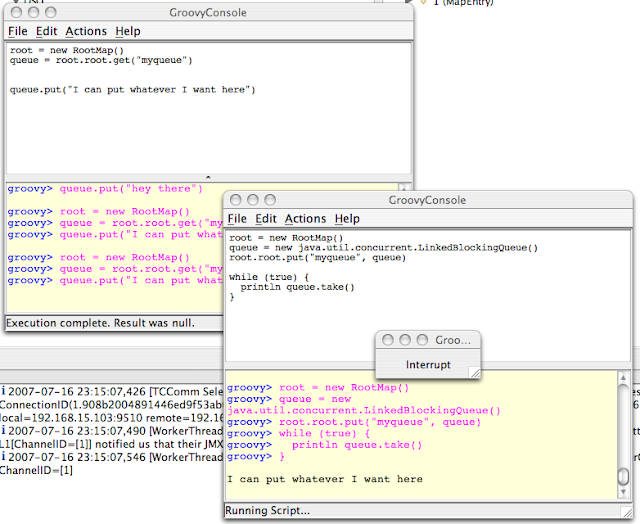
Ok Groovy is cool, but can your Groovy do this?


This took me about 20 minutes to do with Terracotta.  If you're not new to Terracotta, this is pretty old hat.  Distributing a LinkedBlockingQueue is really easy (as seen above).  But then again, being able to use Groovy to distribute anything in Java is ... well pretty powerful.

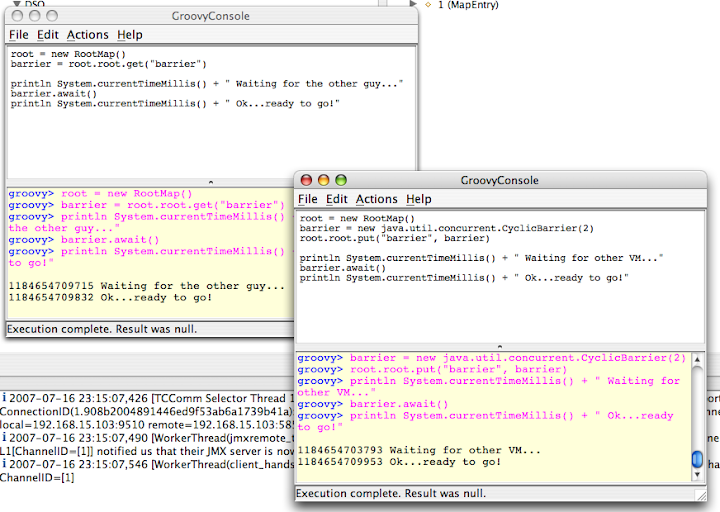
What if you wanted to synchronize two scripts?  Just use a java.util.concurrent.CyclicBarrier:


I could build a distributed test harness in ... oh I don't know another 10 minutes.  But I'll leave that up to you :).

Here's how to get going with Clustered Groovy:

1) Download and unpack Groovy.
2) Set GROOVY_HOME (per their instructions)
3) Download and unpack Terracotta. (Hint: get Version 2.4.  If it's not already final, it will be soon)
4) set TC_HOME (this makes your life easier)
5) You need my Groovy Startup Script - I saved it as groovyConsoleTC.  Sorry, I use a Mac so it is not Windows friendly, but at 5 lines, hopefully you can figure it out:

DIRNAME=`dirname "$0"`

TC_INSTALL_DIR=${TC_HOME}
. "${TC_INSTALL_DIR}/bin/dso-env.sh" -q $DIRNAME/groovy-tc.xml
JAVA_OPTS=$TC_JAVA_OPTS
echo $JAVA_OPTS

. "${GROOVY_HOME}/bin/startGroovy"

startGroovy groovy.ui.Console "$@"


6) You need my RootMap class.  It's not that pretty, it could be improved, but it works:


import java.util.*;
import java.util.concurrent.*;

public class RootMap
{
public final Map root = new ConcurrentHashMap();
}


7) You need my Terracotta config (save it to a file called groovy-tc.xml)


<?xml version="1.0" encoding="UTF-8"?>
<!--

All content copyright (c) 2003-2007 Terracotta, Inc.,
except as may otherwise be noted in a separate copyright notice.
All rights reserved.

-->
<tc:tc-config xmlns:tc="http://www.terracotta.org/config"
xmlns:xsi="http://www.w3.org/2001/XMLSchema-instance"
xsi:schemaLocation="http://www.terracotta.org/schema/terracotta-4.xsd">
<servers>
<server host="%i" name="sample"/>
</servers>
<system>
<configuration-model>development</configuration-model>
</system>

<application>
<dso>
<instrumented-classes>
<include>
<class-expression>Root*</class-expression>
<honor-transient>true</honor-transient>
</include>
</instrumented-classes>
<locks>
<autolock>
<method-expression>* *..*.*(..)</method-expression>
</autolock>
</locks>
<roots>
<root>
<field-name>RootMap.root</field-name>
</root>
</roots>
</dso>
</application>
</tc:tc-config>


If you saved all that to some directory, now:

8) Compile RootMap.java : > javac RootMap.java
9) Make sure your classpath has . in it: > export CLASSPATH=.
10) start up the TC Server in $TC_HOME/bin/start-tc-server.sh
11) start one ore more Groovy Consoles using groovyConsoleTC

Validate you can see a root by executing a Groovy script:


root = new RootMap()
root.root.put("message", "Hello World")


If you run the admin console, you can see your root:

> $TC_HOME/bin/admin.sh

Now try out more advanced stuff like LinkedBlockingQueue!

Update: I've added a tar.gz file with the relevant code: distributedGroovy.tgz